
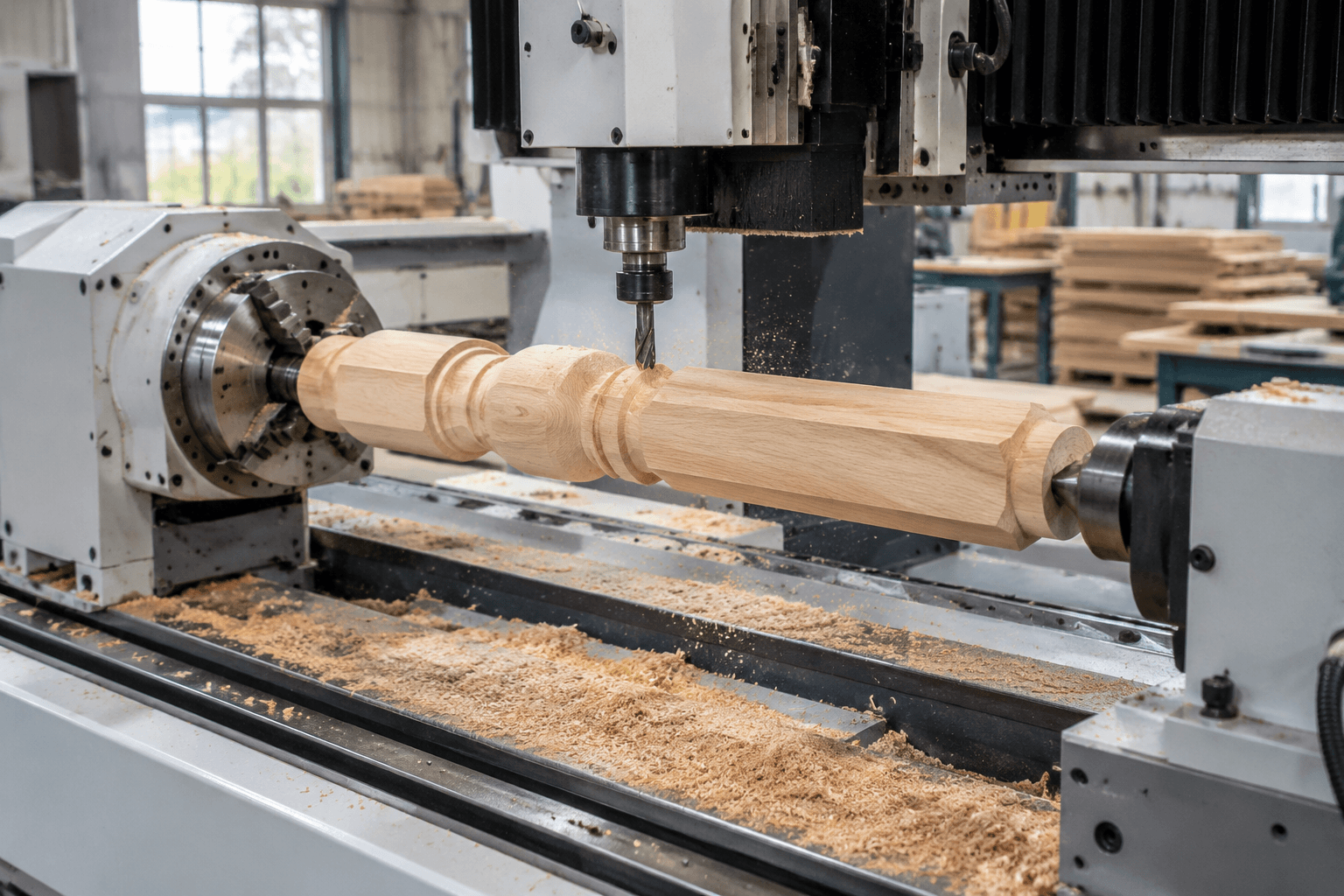
A 4 axis wood CNC machine adds a rotary axis to the linear X, Y, and Z movements of a conventional CNC router. Its value depends on whether a wood part must rotate for multi-face, angled, or circumferential cutting that would otherwise require manual repositioning or more than one setup.
The important distinction is how the rotary axis operates. Some machines only index the workpiece to fixed positions before three-axis cutting resumes, while others coordinate rotary and linear movement during the cut. A listing described as “4 axis” does not automatically confirm simultaneous four-axis machining.
What the Fourth Axis Actually Changes
A three-axis router moves the cutter along X, Y, and Z while the workpiece remains stationary. This arrangement is efficient for sheet goods, signs, cabinet components, pockets, profiles, and relief work that can be reached from above.
On a four-axis wood router, the additional axis is usually an A axis that rotates the workpiece around its longitudinal centerline. This rotation can expose several faces without manually unclamping the part. It can also allow the cutter to follow the circumference of a round or shaped component.
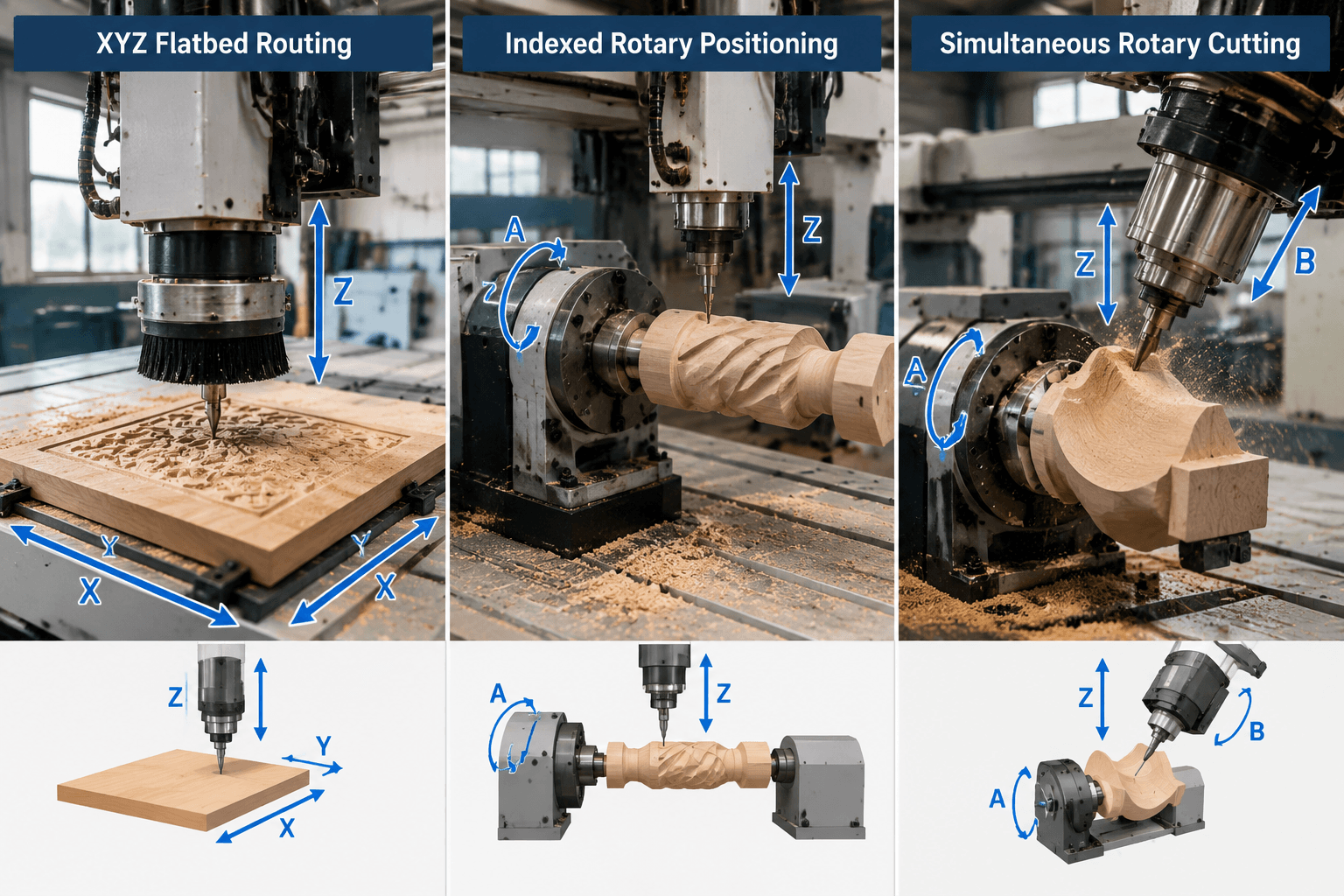
3-axis flatbed       Indexed rotary         Continuous rotary

       Z                    Z                       Z
       |                    |                       |
   Y --+-- X            Y --+-- X               Y --+-- X
 [fixed panel]          [A rotates, stops]       [A rotates during cut]
                        cut face 1               coordinated X/Y/Z/A
                        index to face 2           toolpath movement
Indexed machining is often described as 3+1 operation: the A axis positions the part, locks or holds that angle, and the machine performs a three-axis toolpath. Continuous rotary cutting requires the controller, drives, CAM strategy, and post-processor to output coordinated movement. Buyers should ask which of these modes is supported rather than relying on the axis count in a product title.
Match the Machine to the Part Geometry
The case for a fourth axis begins with tool access. A rotary setup is useful when important surfaces wrap around a part or when several sides must maintain a controlled relationship to the same centerline. It is less compelling when every feature is accessible from one side of a flat blank.
| Part geometry or task | Likely machine fit | Reason |
|---|---|---|
| Flat cabinet panels, signs, nesting, and shallow reliefs | Three-axis flatbed router | The cutter reaches the required features from above, and the bed supports sheet material directly. |
| Square posts with joinery or decoration on several faces | Indexed rotary or repeatable multi-setup three-axis process | Indexing reduces manual repositioning and helps relate features around the part. |
| Table legs, stair components, columns, and cylindrical carvings | Continuous rotary capability may be beneficial | The toolpath can follow surfaces around the workpiece circumference. |
| Irregular components requiring undercuts or access from the ends | Application-specific review | A rotary axis does not automatically provide five-axis-style tool orientation or unrestricted access. |
Wood species, grain direction, blank balance, cutter geometry, and desired surface quality also affect feasibility. A rotary axis improves access, but it does not eliminate tear-out risk, slender-part deflection, or the need for suitable roughing and finishing strategies.
Integrated Machines, Rotary Kits, and 4×8 Attachments
Search results often combine several configurations under terms such as 4 axis CNC router, 4 axis wood CNC machine kit, and 4×8 wood CNC machine. These arrangements can have materially different capacity.
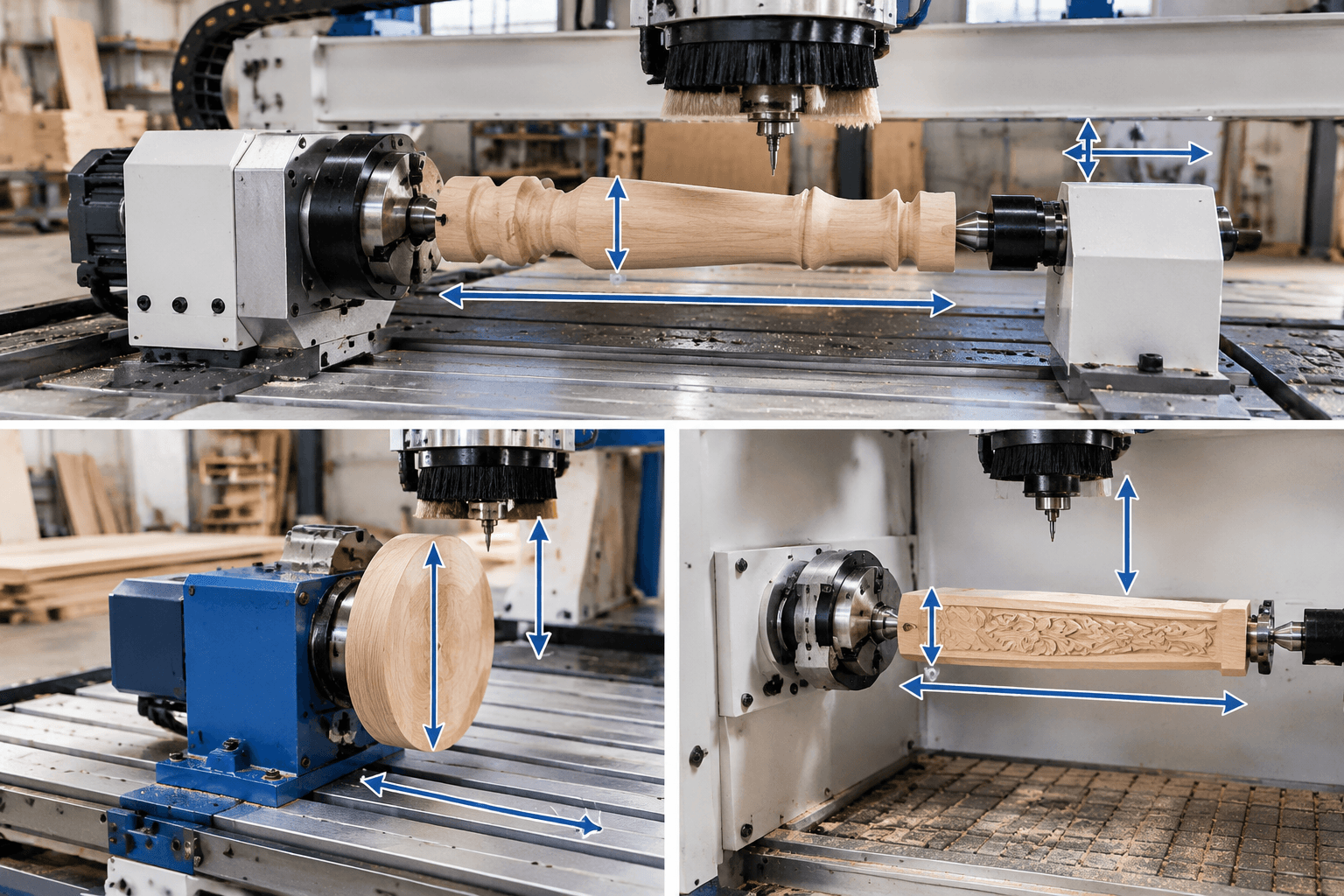
- Integrated rotary machine: The rotary axis is designed into the machine structure and control system. Ask whether it can remain installed during flatbed work, where the axis is positioned, and whether the controller supports indexing, simultaneous motion, or both.
- Bed-mounted attachment: A headstock and tailstock sit on top of the table. This can be a practical add-on, but the assembly consumes table length and Z clearance. The maximum blank diameter may be limited by the distance between the rotary centerline, table, gantry, spindle, and dust hood.
- Recessed or side-mounted axis: The rotary equipment sits below or beside the normal bed level. This may provide more diameter clearance, although gantry travel, spindle reach, tool length, and guarding still define the usable area.
- Conversion kit: A motor, drive, chuck, tailstock, or controller components may be sold separately. Compatibility with the existing control hardware and software must be verified; the presence of rotary hardware alone does not create a complete four-axis workflow.
Bed-mounted:     [headstock]====blank====[tailstock]  above table
Recessed:        [headstock]====blank====[tailstock]  below table level
Side-mounted:    flatbed | [headstock]====blank====[tailstock]

Check: center height, swing diameter, supported length, gantry clearance,
spindle reach, chuck and tailstock space, and dust-collection clearance.
A 4×8 description normally refers to the nominal flatbed class, not the rotary envelope. It does not prove that the full bed remains usable with an attachment installed or that a rotary blank can have the same length or width as a sheet placed on the table.
Specifications That Determine Usable Capacity
Compare documented working limits under the configuration you intend to operate. Nominal machine dimensions are less useful than clear definitions of travel, interference zones, workholding allowances, and software support.
| Specification | What to verify | Why it matters |
|---|---|---|
| Flatbed working envelope | Usable X, Y, and Z travel with clamps, spoilboard, dust hood, and rotary equipment in place | Installed accessories can reduce access even when the advertised bed size is unchanged. |
| Rotary diameter and length | Maximum blank diameter, practical finished diameter, center distance, and space consumed by chuck or faceplate and tailstock | A stated swing or center distance may not equal usable part capacity. |
| Workpiece support | Chuck, collet, faceplate, tailstock, steady rest options, and allowable load documentation | Long, heavy, or unbalanced blanks may need support beyond a headstock and tailstock. |
| Spindle and tooling | Tool interface, available speed and power ranges, cutter diameter limits, and clearance for the intended cuts | Requirements vary with wood species, cut depth, tool engagement, and roughing or finishing strategy. |
| Controller function | Number of controlled axes and support for indexed versus simultaneous X/Y/Z/A movement | A controller may recognize a rotary axis without coordinating it continuously with the linear axes. |
| CAD/CAM compatibility | Rotary toolpath functions, axis orientation, wrapping method, simulation, and machine definition | Three-axis software may design the part but may not produce a valid rotary toolpath. |
| Post-processor | A post matched to the controller, axis naming, rotary direction, units, limits, and code format | Generic output can rotate in the wrong direction or command unsupported movements. |
| Dust and service provisions | Extraction around a rotating blank, guarding, lubrication points, replacement parts, training, and warranty scope | Rotary geometry changes chip direction and may restrict a conventional dust shoe. |
Accuracy and repeatability should be supported by supplier documentation that states the test condition and measurement method. Do not treat an isolated number as universal across different blank lengths, loads, tools, materials, and rotary configurations.
How the Four-Axis Workflow Differs
- Define the machining method. Decide whether each face can be indexed or whether the cutter and workpiece must move together. This choice determines the CAM and controller requirements.
- Model around the rotation centerline. Establish the A-axis direction, stock diameter, part origin, and safe limits. Incorrect centerline data can distort wrapped features or cause excessive cutting.
- Plan workholding before toolpaths. Reserve material for the chuck, faceplate, centers, or tabs. Check whether the tool, collet, spindle body, gantry, clamps, and dust hood can clear the fixtures at every commanded angle.
- Prepare and align the blank. A square, glued, or rough-turned blank must be held securely and aligned with the machine axis. Long stock may require additional support to control vibration and deflection.
- Post and simulate the program. Confirm rotary direction, angular limits, retracts, feed interpretation, and tool changes. Simulation should include the fixtures and machine clearance, not only the finished model.
- Prove the setup cautiously. Follow the machine supplier’s operating and safety instructions, verify extraction and guarding, and observe the initial movement at a controlled setting before normal operation.
Operators also need to understand rotary zero setting, recovery after an interrupted job, and the relationship between angular movement and surface travel. These are additional tasks beyond routine flatbed routing.
How to Read 4-Axis, Kit, 4×8, and Price Listings
Price-oriented listings for the “best 4 axis wood CNC machine” or a “4 axis CNC machine for sale” are useful for finding candidates, but their terminology is not consistent. A 4 axis CNC mill is also a different equipment category: CNC milling commonly describes machining rigid materials with mill-style construction, whereas a wood CNC router is configured around routing applications. Axis count alone does not make the machines equivalent.
| Listing claim | Evidence to request or review |
|---|---|
| “Four-axis machining” | A controller manual, axis configuration, and demonstration showing whether A moves only between cuts or moves simultaneously with linear axes. |
| “Large rotary capacity” | Dimensioned drawings showing center height, usable center distance, chuck and tailstock allowances, and clearance under the gantry. |
| “Compatible with popular software” | The supported CAM workflow, machine definition, licensed modules, and a controller-specific post-processor. |
| “Complete rotary kit” | An itemized scope covering motor, drive, cables, controller integration, chuck or faceplate, tailstock, mounting hardware, guarding, and documentation. |
| “4×8 with rotary axis” | Separate flatbed and rotary working envelopes, including restrictions when both configurations are installed. |
| Published price | A written scope identifying machine configuration, software, accessories, installation, training, delivery terms, service, warranty, and replacement-part provisions. |
Frequently Asked Questions
Is a rotary attachment the same as a true 4-axis wood CNC machine?
Not necessarily. An attachment provides rotary hardware, but the controller and software determine whether it can index the part or coordinate continuous A-axis motion with X, Y, and Z. Mechanical fit, drive integration, and a suitable post-processor must also be confirmed.
Can a 4×8 wood CNC machine use its full bed while the rotary axis is installed?
That depends on the layout. A bed-mounted attachment can occupy table area and reduce Z clearance, while a recessed or side-mounted design may preserve more flatbed space. Obtain separate usable-envelope drawings for flat and rotary operation.
Does 4-axis wood machining require different CAD/CAM software or a dedicated post-processor?
It requires software capable of the intended rotary strategy. Indexed work may be possible through separate setups, while simultaneous cutting generally needs dedicated rotary toolpaths. In both cases, the post-processor must match the controller and axis configuration.
When is a 3-axis router a better fit than a 4-axis machine?
A three-axis router is often the more direct choice when work consists mainly of panels, profiles, pockets, signs, nesting, or top-accessible reliefs. It avoids rotary programming and setup when rotation would not improve tool access or reduce repositioning.
A fourth axis is useful when part geometry justifies rotation, but the phrase “4 axis” is not a complete machine specification. Evaluate the motion mode, rotary envelope, workholding, control, software, post-processor, clearance, dust management, and support scope as one production system.
For furniture and wood-based products that also require made-to-drawing brackets, frames, bases, enclosures, or other fabricated metal parts, review Yishang’s custom metal components for furniture products. Yishang supports B2B OEM and ODM custom metal manufacturing; this related capability does not imply that Yishang supplies wood CNC machines.